> ## Documentation Index
> Fetch the complete documentation index at: https://auth0-feat-init-gt-translations.mintlify.site/llms.txt
> Use this file to discover all available pages before exploring further.
> Découvrez comment configurer vos actions de Flow JSON pour créer des objets JSON, analyser du JSON et convertir du JSON en chaîne de caractères.
# JSON
Cette liste d’actions JSON vous permet de créer, d’analyser et de convertir du JSON en chaîne de caractères.
Créer un objet JSON
Crée un objet JSON. C’est particulièrement utile pour réutiliser son contenu dans d’autres actions du flux.
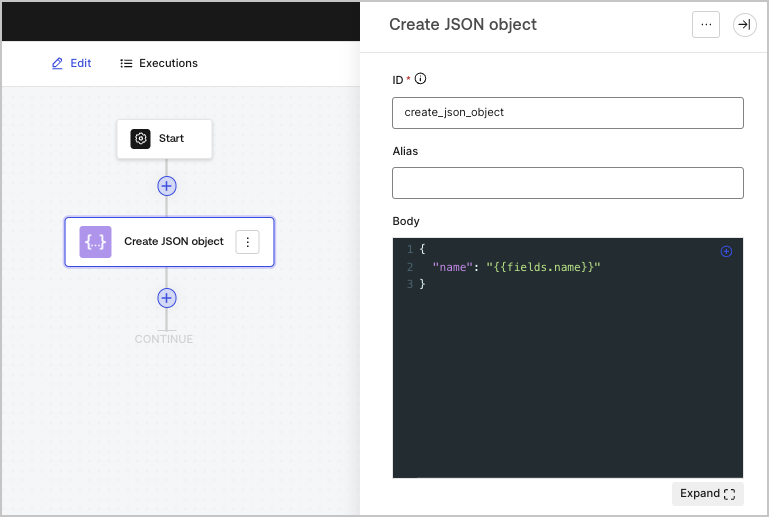 | Paramètre | Description |
| --------- | ------------- |
| Corps | L’objet JSON. |
| Paramètre | Description |
| --------- | ------------- |
| Corps | L’objet JSON. |
Objet de sortie
| Propriété | Type | Description |
| --------- | ----- | ------------- |
| `result` | Objet | L’objet JSON. |
Exemple d’objet de sortie
```json lines theme={null}
{
"result": {
"name": "John Doe"
}
}
```
Analyser un objet JSON
Analyse un objet JSON contenu dans une chaîne de caractères pour le convertir en objet JSON.
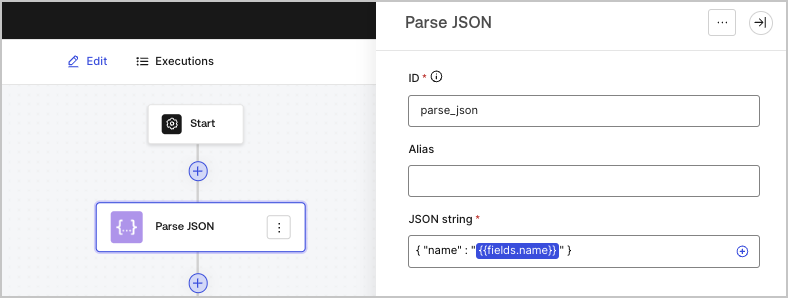 | Paramètre | Description |
| ------------------------- | ----------------------------- |
| Chaîne JSON (obligatoire) | La chaîne de caractères JSON. |
| Paramètre | Description |
| ------------------------- | ----------------------------- |
| Chaîne JSON (obligatoire) | La chaîne de caractères JSON. |
Objet de sortie
| Propriété | Type | Description |
| --------- | ----- | --------------------- |
| `object` | Objet | L’objet JSON analysé. |
Exemple d’objet de sortie
```json lines theme={null}
{
"object": {
"name": "John Doe"
}
}
```
Convertir un objet JSON en chaîne de caractères
Convertit un objet JSON en chaîne de caractères.
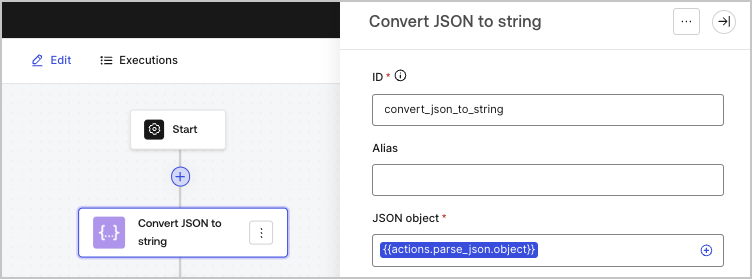 | Paramètre | Description |
| ------------------------ | -------------------------------------------------------- |
| objet JSON (obligatoire) | L’objet JSON qui sera sérialisé en chaîne de caractères. |
| Paramètre | Description |
| ------------------------ | -------------------------------------------------------- |
| objet JSON (obligatoire) | L’objet JSON qui sera sérialisé en chaîne de caractères. |
Objet de sortie
| Propriété | Type | Description |
| --------- | ------ | ----------------------- |
| `json` | String | L’objet JSON sérialisé. |
Exemple d’objet de sortie
```json lines theme={null}
{
"json": "{\"name\":\"John Doe\"}"
}
```